Thursday, September 5, 2013

Back to School Night

This is what I shared with your parents during Back-to-School Night...

Welcome to Technology
Mrs. Mary Beth Morell
5th and 6th graders will meet with me during one 40-minute period each week.  Our studies this year will focus on the following areas:
Keyboarding, Google Drive and Blogging
We will be devoting much of the first quarter to these basic skills.  The blogs will be through KidBlog, and not viewable to the public.
Second and Third Quarters – Research and Presentation Skills
During the second and third quarters, we will work on a variety of skills related to Internet searching and researching.  I will introduce the students to effective searching strategies, how to identify a reputable website, how to organize research, and how to cite a source properly using an online citation maker.   Once the research is complete, we will use a variety of presentation tools, such as PowerPoint, Prezi, and iMovie.. I hope to work closely with the classroom teachers so that most projects complement the 5th and 6th grade core curriculum, but sometimes we touch upon current events or geography in our projects.
Fourth Quarter – Final Project
During the fourth quarter, the students will complete a final project using many of the skills used throughout the year.  Last year, each 6th grader chose a National Park.  They completed comprehensive research, including a tour of the park using GoogleEarth, compiled a file of photos, then created an online poster of the Park using Glogster.  Citing sources was an important part of the project.
Digital Citizenship
Throughout the year, I will be doing mini-lessons on Digital Citizenship, using the curriculum from CommonSense Media.  Topics will include Privacy and Digital Footprints, Online Safety and Security, Connected Culture and Respecting Creative Work.  This is a new program to Holy Trinity this year, and I look forward to exploring these topics with the students.  Please consider subscribing to Common Sense Media on commonsensemedia.org to help you navigate the constantly evolving world of social media with your child.

The Blog
Every week, I will provide updates on the 5th and 6th Grade Technology Blogs – my answer to a teacher homework page.  Students will be able to access any links or resources I have posted, and parents will be able to see what we are doing in technology class.  My contact information will be there as well.  The link to the blogs can be found on my homework page: http://www.htsdc.org/faculty-homework-pages/morell/
Internet Resources
On the blog, I will maintain a list of Internet resources for research, and for learning fun.
Scantron Testing – Scantron testing will take place during technology class three times a year – September, February and May.  Each round takes three weeks of class time.
Questions, Comments or Suggestions?  Reach me on mbmorell@htsdc.org

Thursday, August 29, 2013

Welcome to 5th Grade Technology!


Welcome!

First, we will begin with a quick Prezi to outline our plan of action for the year:


Then, we will try to login to our Gmail accounts, and review where to find Google Drive and our Email.

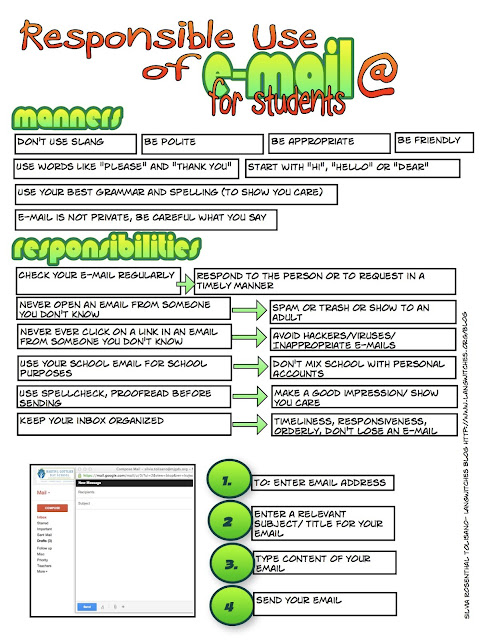
We will review how to send a lovely, polite Email, and craft some guidelines for using Email in the 5th grade.

Following is one of my favorite resources to consult when drafting an Email (thank you Langwitches blog!)


Wednesday, June 5, 2013

Today, we Blog!


Today, please open your blog.

I would like you to complete at least one entry with five books you would like to read from the Summer Reading list.  The link to that blog can be found here:

http://htssummerlearningblog.blogspot.com/p/required-reading-for-5th-and-6th-grades.html

You must include

The title of your book
The author of your book
A description of the book, which can be copied from the list

And a photo of the cover of the book.


Thursday, April 11, 2013

Finish your Prezi!

Today, you will have a chance to finish the Prezis you started last week about your thoughts on helping this year's 4th graders transition to 5th grade.

I would like you each to include:

  • At least 7 of your ideas or suggestions from the worksheets you completed in language arts class last week (the sub will have the worksheets in my binder).
  • At least two pictures.
  • Please be sure that the spelling and punctuation is perfect!


Have fun with this, and help each other if you get stuck.

Here is the link to Prezi:

www.prezi.com


(Remember, you login using your Email address and the same password you use for the network and your Email.)

Mrs. Morell

Tuesday, April 9, 2013

A Prezi!

Today, we will start Prezis presentations.

Your goal is to help the current 4th graders understand what life is like in 5th Grade.  You should have filled out the following worksheet before arriving in class.  We'll base our Prezi on this.


Name: ___________________________   Date: ____________________

5th grade Technology Project

Please fill in the blanks:

The best part of coming to the Upper School is____________________________
The best part of 5th grade is_____________________________________________
If I could give you one tip for success in the 5th grade, it would be___________
In 5th grade, always_______________________________________________________
In 5th grade, never________________________________________________________
I wish I had known___________________________before I came to the 5th grade.
The three words that best describe a model 5th grade student are________
The 5 most important lessons I learned in 5th grade________________________
The best book we read this year was_______________________________
The coolest science experiment we did was_________________________
Did you know___________________ (add something you learned in SS or at Gettysburg)?
***Save this completed sheet for this week’s technology class.

But first, we have to learn some Prezi basics:


Finally, we will set up Prezi accounts today:

http://prezi.com/

You will need to set up an account with your HTS Email account and password - it will be a free account for students.

You will be creating a Prezi for your biography project, so I thought it would be fun if you created a quick biography about yourself to practice.  Here is my sample:


Let's watch a Prezi tutorial: