Wednesday, October 23, 2013

Keyboarding and Post Your Magazine Cover to Kidblog


Today, we will continue to work on our keyboarding skills using Typing Club:

https://holy-trinity-school.typingclub.com/

You will login using your lastnamefirstinitial (morellm) and our password will be: htstype.

We will then post your magazine cover to your blog.

I would like you to write about what you enjoyed most about creating the magazine cover... and what you learned about your tribe.

Happy keyboarding and blogging!

Mrs. Morell

Thursday, October 17, 2013

Keyboarding and Blogging


Today, we will continue to work on our keyboarding skills using Typing Club:

https://holy-trinity-school.typingclub.com/

You will login using your lastnamefirstinitial (morellm) and our password will be: htstype.

We'll take a typing test today.

Jade and Sofia D may move on to blogging for the entire class:

http://kidblog.org/5thGrade-Morell/

And either continue to work on their favorite things prompt, or move onto the second blogging challenge.

With 20 minutes left, you will have a blogging assignment.

While some of you left lovely comments using complete sentences and perfect spelling and punctuation, I am overall not overly impressed with the quality of your comments.  So, we must review!

I would like you to read the "Things to Consider Before You Comment" post, and leave a thoughtful comment that shows you know the difference between Social and Academic comments.  You must write AT LEAST two full sentences and use perfect spelling and punctuation.  Then, you may either revise some of your comments, or begin the second blogging prompt.

Happy Typing and Blogging!

Mrs. Morell

Thursday, October 10, 2013

Just Keep Typing


Today, we will continue to work on our keyboarding skills using Typing Club:

https://holy-trinity-school.typingclub.com/

You will login using your lastnamefirstinitial (morellm) and our password will be: htstype.

Please type for another class period - next week we will take the test again.

Jade and Sofia D may move on to blogging for the entire class:

http://kidblog.org/5thGrade-Morell/

And either continue to work on their favorite things prompt, or move onto the second blogging challenge.

With 15 minutes left, in class you may work on your blogs.

Happy Typing!

Mrs. Morell

Thursday, October 3, 2013

Typing Club

Today, we will work on our keyboarding skills using a new program called Typing Club:

https://holy-trinity-school.typingclub.com/

You will login using your lastnamefirstinitial (morellm) and our password will be: htstype.

I will ask that you all take the Typing Test to begin the day, then work through the first few lessons.

If you reach 25 Words Per Minute or above, you may move on to blogging:

http://kidblog.org/5thGrade-Morell/

Happy Typing!

Mrs. Morell


Thursday, September 26, 2013

Today, We Blog!


Today, we will login to our new KidBlog accounts.

The link is here:

http://kidblog.org/5thGrade-Morell/

and I will tell you our passwords :)

You will copy and paste your "Favorite Things" Assignment from last week.

And then, you may comment on each other's posts.

We will review the guidelines for commenting today!

Mrs. Morell


Thursday, September 5, 2013

Back to School Night

This is what I shared with your parents during Back-to-School Night...

Welcome to Technology
Mrs. Mary Beth Morell
5th and 6th graders will meet with me during one 40-minute period each week.  Our studies this year will focus on the following areas:
Keyboarding, Google Drive and Blogging
We will be devoting much of the first quarter to these basic skills.  The blogs will be through KidBlog, and not viewable to the public.
Second and Third Quarters – Research and Presentation Skills
During the second and third quarters, we will work on a variety of skills related to Internet searching and researching.  I will introduce the students to effective searching strategies, how to identify a reputable website, how to organize research, and how to cite a source properly using an online citation maker.   Once the research is complete, we will use a variety of presentation tools, such as PowerPoint, Prezi, and iMovie.. I hope to work closely with the classroom teachers so that most projects complement the 5th and 6th grade core curriculum, but sometimes we touch upon current events or geography in our projects.
Fourth Quarter – Final Project
During the fourth quarter, the students will complete a final project using many of the skills used throughout the year.  Last year, each 6th grader chose a National Park.  They completed comprehensive research, including a tour of the park using GoogleEarth, compiled a file of photos, then created an online poster of the Park using Glogster.  Citing sources was an important part of the project.
Digital Citizenship
Throughout the year, I will be doing mini-lessons on Digital Citizenship, using the curriculum from CommonSense Media.  Topics will include Privacy and Digital Footprints, Online Safety and Security, Connected Culture and Respecting Creative Work.  This is a new program to Holy Trinity this year, and I look forward to exploring these topics with the students.  Please consider subscribing to Common Sense Media on commonsensemedia.org to help you navigate the constantly evolving world of social media with your child.

The Blog
Every week, I will provide updates on the 5th and 6th Grade Technology Blogs – my answer to a teacher homework page.  Students will be able to access any links or resources I have posted, and parents will be able to see what we are doing in technology class.  My contact information will be there as well.  The link to the blogs can be found on my homework page: http://www.htsdc.org/faculty-homework-pages/morell/
Internet Resources
On the blog, I will maintain a list of Internet resources for research, and for learning fun.
Scantron Testing – Scantron testing will take place during technology class three times a year – September, February and May.  Each round takes three weeks of class time.
Questions, Comments or Suggestions?  Reach me on mbmorell@htsdc.org

Thursday, August 29, 2013

Welcome to 5th Grade Technology!


Welcome!

First, we will begin with a quick Prezi to outline our plan of action for the year:


Then, we will try to login to our Gmail accounts, and review where to find Google Drive and our Email.

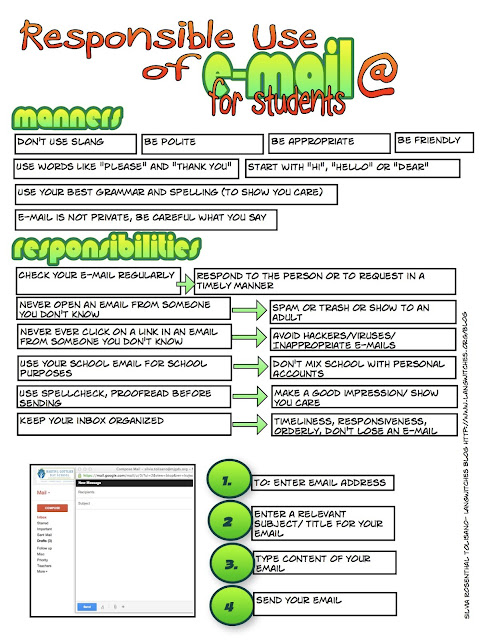
We will review how to send a lovely, polite Email, and craft some guidelines for using Email in the 5th grade.

Following is one of my favorite resources to consult when drafting an Email (thank you Langwitches blog!)